Troubleshooting
Runtimes missing from some DataScience projects
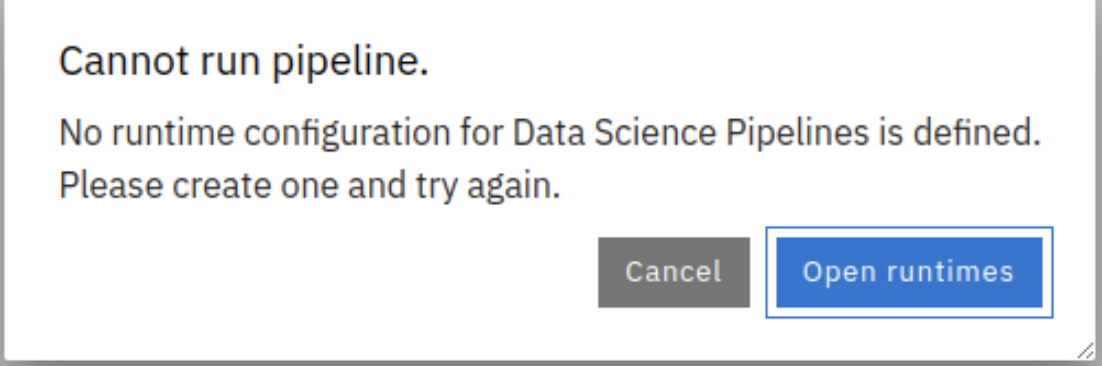
Solution
- Delete Workbench
- Check if pipelineserver is running
- Recreate Workbench
Red Hat Service Interconnect problems
Check Site controller pods
If you see something like this on the robot-site
tail -f /var/log/robot-config-service.log /var/log/robot-config-service-ansible-core.log
| 2026-04-22 14:14:57,035 - __main__ - WARNING - getToken returned HTTP 503, retrying in 5s...
2026-04-22 14:15:02,612 - __main__ - WARNING - getToken returned HTTP 503, retrying in 5s...
2026-04-22 14:15:08,228 - __main__ - WARNING - getToken returned HTTP 503, retrying in 5s...
2026-04-22 14:15:13,809 - __main__ - WARNING - getToken returned HTTP 503, retrying in 5s...
2026-04-22 14:15:19,353 - __main__ - WARNING - getToken returned HTTP 503, retrying in 5s...
2026-04-22 14:15:24,900 - __main__ - WARNING - getToken returned HTTP 503, retrying in 5s...
2026-04-22 14:15:30,447 - __main__ - WARNING - getToken returned HTTP 503, retrying in 5s...
2026-04-22 14:15:35,993 - __main__ - WARNING - getToken returned HTTP 503, retrying in 5s...
2026-04-22 14:15:41,521 - __main__ - WARNING - getToken returned HTTP 503, retrying in 5s...
2026-04-22 14:15:47,414 - __main__ - WARNING - getToken returned HTTP 503, retrying in 5s...
2026-04-22 14:15:52,959 - __main__ - WARNING - getToken returned HTTP 503, retrying in 5s...
2026-04-22 14:15:58,586 - __main__ - WARNING - getToken returned HTTP 503, retrying in 5s...
2026-04-22 14:16:04,213 - __main__ - WARNING - getToken returned HTTP 503, retrying in 5s...
|
and
| oc logs -n openshift-operators deployment/skupper-site-controller
|
| 026/04/22 10:51:39 Skupper site controller watching all namespaces
2026/04/22 10:51:39 Version: 1.9.4-rh-1
2026/04/22 10:51:39 Cluster role "skupper-service-controller-basic" already exists
2026/04/22 10:51:39 Starting the Skupper site controller informers
2026/04/22 10:51:39 Waiting for informer caches to sync
2026/04/22 10:51:39 Checking if sites need updates (1.9.4-rh-1)
2026/04/22 10:51:39 Starting workers
2026/04/22 10:51:39 Started workers
2026/04/22 12:54:21 Initialising skupper site ...
2026/04/22 12:54:21 Error initialising skupper: OpenShift cluster not detected for --ingress type route
E0422 12:54:21.198722 1 controller.go:204] OpenShift cluster not detected for --ingress type route
2026/04/22 12:54:21 Handling token request for robot/robocop
2026/04/22 12:54:21 Generating token for request robocop...
2026/04/22 12:54:21 Failed to generate token for request robocop: Skupper is not installed in robot
E0422 12:54:21.208132 1 controller.go:204] Skupper is not installed in robot
|
Solution
=> Restart the pod
| oc delete pod -n openshift-operators -l application=skupper-site-controller
|
Runtimes missing from some DS projects
In short: Re-create workbench
- Delete Workbench
- Check if pipeline server is running
- Recreate Workbench
- Use the pre-existing PVC
on MacOS: ansible-navigator fails with statfs errors for a com.apple.launchd component
2026-04-21T12:58:50.102432+00:00 CRITICAL 'ansible_navigator.actions.run_playbook._handle_message' Unhandled message from runner queue, discarded: {'event': 'verbose', 'uuid': '70814924-d103-4013-9c32-9249516adb46', 'counter': 1, 'stdout': 'Error: statfs /var/run/com.apple.launchd.AQlE6wFBxl: no such file or directory', 'start_line': 0, 'end_line': 1, 'runner_ident': '2658a553-e817-4c91-885e-e2d5bde2cfd8', 'created': '2026-04-21T12:58:50.095283+00:00'}
unset SSH_AUTH_SOCK
on MacOS: ansible-navigator fails with Bad configuration option
fatal: [robocop]: UNREACHABLE! => {"changed": false, "msg": "Failed to connect to the host via ssh: /root/.ssh/config: line 2: Bad configuration option: warnweakcrypto\r\n/root/.ssh/config: line 48: Bad configuration option: usekeychain\r\n/root/.ssh/config: terminating, 2 bad configuration options", "unreachable": true}
fatal: [robocop]: UNREACHABLE! => {"changed": false, "msg": "Failed to connect to the host via ssh: /root/.ssh/config: line 9: Bad configuration option: indentityfile\r\n/root/.ssh/config: terminating, 1 bad configuration options", "unreachable": true}
Comment out the relevant parts from the ssh/config of your user. It is copied with wrong casing. Think about using a dedicated configuration for the robot hackathon.
Robot does not move, but camera does work
Triage
- LED of the Pi HAT is continuously RED
- Camera via API works
- utilizing move commands results in timeouts & robot not moving
Solution
Ensure the Power is connected to the Pi HAT and not to the Pi itself. The Power can be provided with the powersupply or the battery pack.
DNS Errors
Triage
| tail -f /var/log/robot-config-service.log
|
| ==> /var/log/robot-config-service.log <==
2026-04-23 12:36:09,362 - __main__ - WARNING - Failed to fetch https://raw.githubusercontent.com/cloud-native-robotz-hackathon/robot-auto-register-78b09/main/catch-all: HTTPSConnectionPool(host='raw.githubusercontent.com', port=443): Max retries exceeded with url: /cloud-native-robotz-hackathon/robot-auto-register-78b09/main/catch-all (Caused by NewConnectionError('<urllib3.connection.HTTPSConnection object at 0xffff94aaee00>: Failed to establish a new connection: [Errno -3] Temporary failure in name resolution'))
2026-04-23 12:36:09,362 - __main__ - INFO - Retrying in 10s
2026-04-23 12:36:19,368 - __main__ - INFO - Fetching cluster URL from GitHub raw: https://raw.githubusercontent.com/cloud-native-robotz-hackathon/robot-auto-register-78b09/main/robocop
2026-04-23 12:36:19,376 - __main__ - WARNING - Failed to fetch https://raw.githubusercontent.com/cloud-native-robotz-hackathon/robot-auto-register-78b09/main/robocop: HTTPSConnectionPool(host='raw.githubusercontent.com', port=443): Max retries exceeded with url: /cloud-native-robotz-hackathon/robot-auto-register-78b09/main/robocop (Caused by NewConnectionError('<urllib3.connection.HTTPSConnection object at 0xffff94aae230>: Failed to establish a new connection: [Errno -3] Temporary failure in name resolution'))
2026-04-23 12:36:19,377 - __main__ - INFO - Fetching cluster URL from GitHub raw: https://raw.githubusercontent.com/cloud-native-robotz-hackathon/robot-auto-register-78b09/main/catch-all
2026-04-23 12:36:19,387 - __main__ - WARNING - Failed to fetch https://raw.githubusercontent.com/cloud-native-robotz-hackathon/robot-auto-register-78b09/main/catch-all: HTTPSConnectionPool(host='raw.githubusercontent.com', port=443): Max retries exceeded with url: /cloud-native-robotz-hackathon/robot-auto-register-78b09/main/catch-all (Caused by NewConnectionError('<urllib3.connection.HTTPSConnection object at 0xffff94aae260>: Failed to establish a new connection: [Errno -3] Temporary failure in name resolution'))
2026-04-23 12:36:19,388 - __main__ - ERROR - Could not fetch cluster URL from GitHub raw (tried robot name and catch-all)
2026-04-23 12:36:19,389 - __main__ - WARNING - Could not resolve cluster URL from redirect, skipping this cycle
2026-04-23 12:36:19,389 - __main__ - WARNING - No cached event ID - manual intervention may be needed
2026-04-23 12:36:19,389 - __main__ - WARNING - Robot Config Service completed with warnings
|
Solution
- Ensure the WLAN is up, before the robot starts.
- Reboot robot.
Creating DevSpaces errors with config-map missing
Triage
| Error creating DevWorkspace deployment: Detected unrecoverable event FailedMount 3 times: MountVolume.SetUp failed for volume "continue-config-volume" : configmap "continue-config" not found
|
Solution
- Ensure you are logged in as a team-X and not as admin-user
Application is not available
"
Triage
curl -X POST -H "Host: starterapp-python-robot-app.apps.robocop" http://robocop.robot.svc.cluster.local:80/run
* Check GitOps / ArgoCD with your Team Number
Solution